Most of the time the person who needs the valuation isn’t the person standing next to the machine. You’re at a desk; the excavator is in a yard two hundred miles away. Send-a-link fixes that: you create a link, send it to whoever is with the machine, and they take the photos on their phone. The valuation lands in your account a minute later.
Step 1 — Create the link
On your dashboard, find the Send-a-link inspection card. Add an optional reference so you can tell links apart later — “JCB at Leeds yard”, a deal number, whatever you use — and click Create inspection link.
Step 2 — Send it
Copy the link and send it by text, WhatsApp or email to the borrower, dealer or colleague who’s with the machine. Anyone with the link can open it — no ExactVal account needed on their side.
Step 3 — They take the photos
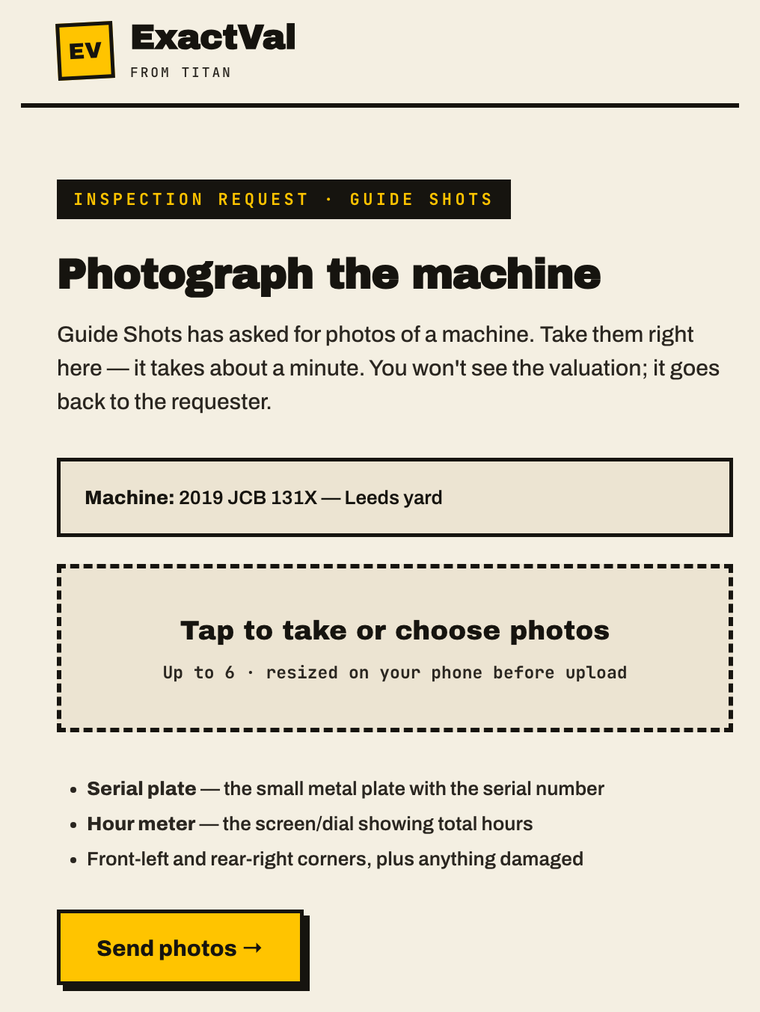
The link opens a simple capture page on their phone — exactly as above — showing who’s asking and which machine it’s about. They take up to six photos. The two that matter most:
- The serial plate — the small metal identification plate. This confirms the machine’s identity.
- The hour meter — the dial or screen showing total hours.
- Then the front-left and rear-right corners, and anything damaged.
They tap Send photos and they’re done. They never see the valuation — figures only go to you.
Step 4 — The valuation arrives
Within about a minute the valuation appears in Your valuations on the dashboard, exactly like one you ran yourself: retail, average and fire-sale figures, condition grade, confidence score and the comparable sales behind the number. The link table shows USED with a jump straight to the report.
Photos taken through the link are captured in-session — not forwarded from a gallery or recycled from an old listing. That’s worth real comfort on asset existence.
Good to know
- One credit per completed valuation — charged to your account (the sender), never the inspector. If the photos can’t produce a valuation, you aren’t charged.
- Links are single-use — once photos are submitted, the link is dead. A double-tap on send can’t run it twice.
- Links expire after 7 days — create a fresh one if it lapses.
- Keep a credit in your balance — if your account is at zero, the inspector will be asked to tell you before anything runs.
If something goes wrong
- “This link has expired” — it’s older than 7 days or mistyped. Create a new one from the dashboard.
- “Already submitted” — photos were already sent on this link. Check Your valuations; create a new link if you need another go.
- The machine couldn’t be identified — almost always a missing serial-plate shot. Send a fresh link and ask specifically for the plate close-up.
Questions? hello@exactval.com — we read everything.